接口原理
- 商城用户端和后台管理端我们用不同的授权机制实现,后台管理端用的传统的oauth2,商城用户端我们自已写的授权机制,统一封装到
joolun-common-portal模块中 - 我们模块名定义:后台访问
模块名-admin走oauth2授权,商城用户端访问模块名-api引入joolun-common-portal不走oauth2授权,后台和商城用户端分开调用 - 比如现在我们将商城分为
joolun-mall-api和joolun-mall-admin分别给商城用户端和后台管理端访问 - 商城端接口访问不走oauth2授权,所以要将请求自动放行(joolun-mall-api-dev.yml)
## spring security 配置
security:
  oauth2:
    client:
      # 无需token访问的url
      release-urls:
        - /**
-
通过上面配置后,所有接口都已经对外开放,但实际情况中有部分接口是需要商城用户登录了才能获取到数据的(比如订单)
-
所以我们定义了一个@ApiLogin注解,在需要商城用户登录了才能访问的接口上加上这个注解。带有@ApiLogin注解的接口必须登录商城才能访问
-
注意:和其他端不同,小程序端和公众号h5端我们规定所有接口必须登录微信才能访问;小程序端和公众号h5端进来的第一件事就是微信登录获取session,新用户获取的session没有商城用户信息,访问@ApiLogin注解接口时会触发商城账号登录
这样一来小程序端和公众号h5端新用户进来就有两次登录,所有用户一进商城就触发微信授权登录,用户无感知的,当访问@ApiLogin注解接口的时候新用户还会触发商城账号注册登录,是有感知的,已经登录过的用户则不需要再登录商城
这样做的好处就是,当用户第一次在小程序或公众号h5中登录了商城账号的时候会把微信用户和商城用户绑定起来,以后用户再进商城的时候,将自动登录商城,只进行一次无感知的微信授权登录
-
微信登录接口(com.joolun.cloud.mall.api.controller.WxUserController)
-
商城登录接口(com.joolun.cloud.mall.api.controller.UserInfoController)
-
核心逻辑在ThirdSessionInterceptor拦截器中,判断不同的端,完成不同的拦截校验,并根据ThirdSession自动维护租户ID(tenantId)
@Override
public boolean preHandle(HttpServletRequest request, HttpServletResponse response, Object handler) throws Exception {
		HandlerMethod method = (HandlerMethod) handler;
		//如果是服务间调用,直接放行
		Inside inside =  method.getMethodAnnotation(Inside.class);
		if(inside != null){
			return Boolean.TRUE;
		}
		//判断访问的control是否添加ApiLogin注解
		ApiLogin apiLogin =  method.getMethodAnnotation(ApiLogin.class);

		//获取header中的客户端类型
		String clientTypeHeader = request.getHeader(MallConstants.HEADER_CLIENT_TYPE);
		String appIdHeader = request.getHeader(MallConstants.HEADER_APP_ID);
		//普通h5端、没有appId的微信H5、APP,只对@ApiLogin注解的接口进行Session校验
		if(MallConstants.CLIENT_TYPE_H5.equals(clientTypeHeader) ||
				(MallConstants.CLIENT_TYPE_H5_WX.equals(clientTypeHeader) && StrUtil.isBlank(appIdHeader)) ||
				MallConstants.CLIENT_TYPE_APP.equals(clientTypeHeader) ){
			if(apiLogin != null && apiLogin.mustLogin()){//此接口必须登录才能访问
				this.judeSession(request, response, apiLogin);
			}else{
				TenantContextHolder.setTenantId(request.getHeader(MallConstants.HEADER_TENANT_ID));//设置租户ID
				String thirdSessionHeader = request.getHeader(MallConstants.HEADER_THIRDSESSION);
				if(StrUtil.isNotBlank(thirdSessionHeader)){
					//获取缓存中的ThirdSession
					String key = WxConstants.THIRD_SESSION_BEGIN + ":" + thirdSessionHeader;
					Object thirdSessionObj = redisTemplate.opsForValue().get(key);
					if(thirdSessionObj == null) {//session过期
						ThirdSessionHolder.clear();
					}else {
						String thirdSessionStr = String.valueOf(thirdSessionObj);
						ThirdSession thirdSession = JSONUtil.toBean(thirdSessionStr, ThirdSession.class);
						ThirdSessionHolder.setThirdSession(thirdSession);
					}
				}else{
					ThirdSessionHolder.clear();
				}
			}
			return Boolean.TRUE;
		}
		//小程序端或带有appId的微信H5的所有接口需要登录才能访问,校验thirdSession
		this.judeSession(request, response, apiLogin);
		return Boolean.TRUE;
	}
- 不需要拦截的接口可在joolun-common/joolun-common-portal/src/main/java/com/joolun/cloud/common/portal/config/WebConfig.java中放行,比如订单支付回调
@Configuration
@AllArgsConstructor
public class WebConfig implements WebMvcConfigurer {
	private final RedisTemplate redisTemplate;

	/**
	 * 拦截器
	 * @param registry
	 */
	@Override
	public void addInterceptors(InterceptorRegistry registry) {
		/**
		 * 进入ThirdSession拦截器
		 */
		registry.addInterceptor(new ThirdSessionInterceptor(redisTemplate))
				//放行接口
				.excludePathPatterns("/wxuser/loginma",//小程序登录
						"/wxuser/loginmp",//公众号h5登录
						"/thememobile",//获取商城主题装修配置
						MallConstants.ORDER_NOTIFY_URL_WX,//订单支付回调
						MallConstants.ORDER_NOTIFY_URL_ALI,//订单支付回调
						"/orderinfo/notify-logisticsr",//订单物流回调
						MallConstants.ORDER_REFUNDS_NOTIFY_URL);//订单退款回调
	}
}
- 登录成功后接口会返回一个UserInfo对象,将对象中的third_session保存在前端
loginWxMa(){
    return new Promise((resolve, reject) => {
        let that = this;
        uni.login({
            success: function(res) {
                if (res.code) {
                    api.loginWxMa({
                        jsCode: res.code
                    }).then(res => {
                        uni.hideLoading();
                        let userInfo = res.data;
                        uni.setStorageSync('third_session', userInfo.thirdSession);
                        uni.setStorageSync('user_info', userInfo);
                        // 获取购物车数量
                        that.shoppingCartCount();
                        resolve("success");
                    });
                }
            }
        });
    });
},
- 接口header自动赋参
读joolun-plus-uniapp/utils/api.js源码,可知在每次接口请求前,我们会自动给接口header中带上third_session和client-type,所以我们自己加接口的时候无需维护这些,如果在外部用postmain调试接口则需手动在header中加上这些参数,否则会报session错
uni.request({
    url: _url,
    method: method,
    data: data,
    withCredentials: true,
    header: {
        //#ifdef H5
        'client-type': util.isWeiXinBrowser() ? 'H5-WX' : 'H5',//客户端类型H5或微信H5
        'tenant-id': getApp().globalData.tenantId,
        'app-id': getApp().globalData.appId ? getApp().globalData.appId : '', //微信h5有appId
        //#endif
        //#ifndef H5
        'client-type': 'MA',//客户端类型小程序
        'app-id': uni.getAccountInfoSync().miniProgram.appId, //小程序appId
        //#endif
        'third-session': uni.getStorageSync('third_session') ? uni.getStorageSync('third_session') : '',
    },
    success(res) {
        if (res.statusCode == 200) {
            if (res.data.code != 0) {
                if (res.data.code == 60001) {
                    //session过期,则清除过期session,并重新加载当前页
                    if(!getApp().globalData.logining){
                        getApp().globalData.logining = true//防止同时多个接口触发登录
                        uni.removeStorageSync('third_session');
                        setTimeout(function() {
                            getApp().globalData.logining = false;
                        }, 5000);
                        getApp().initPage().then(res => {
                            var pages = getCurrentPages(); // 获取页面栈
                            var currPage = pages[pages.length - 1]; // 当前页面
                            currPage.onLoad(currPage.options)
                            currPage.onShow()
                        });
                    }
                    reject("session过期重新登录");
                }else if (res.data.code == 60002 || res.data.code == 60003) {
                    uni.reLaunch({
                        url: '/pages/login/index'
                    });
                    reject("请先登录商城");
                }else{
                    uni.showModal({
                        title: '提示',
                        content: res.data.msg + '',
                        success() {},
                        complete() {

                        }
                    });
                    reject(res.data.msg);
                }
            }
            resolve(res.data);
        } else if (res.statusCode == 404) {
            uni.showModal({
                title: '提示',
                content: '接口请求出错,请检查手机网络',
                success(res) {}
            });
            reject();
        } else {
            console.log(res);
            uni.showModal({
                title: '提示',
                content: res.errMsg + ':' + res.data.message + ':' + res.data.msg,
                success(res) {}
            });
            reject();
        }
    },
    fail(error) {
        console.log(error);
        uni.showModal({
            title: '提示',
            content: '接口请求出错:' + error.errMsg,
            success(res) {}
        });
        reject(error);
    },
    complete(res) {
        uni.hideLoading();
    }
});
- 这样每次接口请求都会自动带上third_session,后台ThirdSessionInterceptor拦截器校验请求是否合法
postman调试@ApiLogin注解的接口
- 通过上面原理介绍得知,我们只要知道third_session就能直接用postman访问带有@ApiLogin注解的接口了,没有带third_session会报60002:session不能为空错误
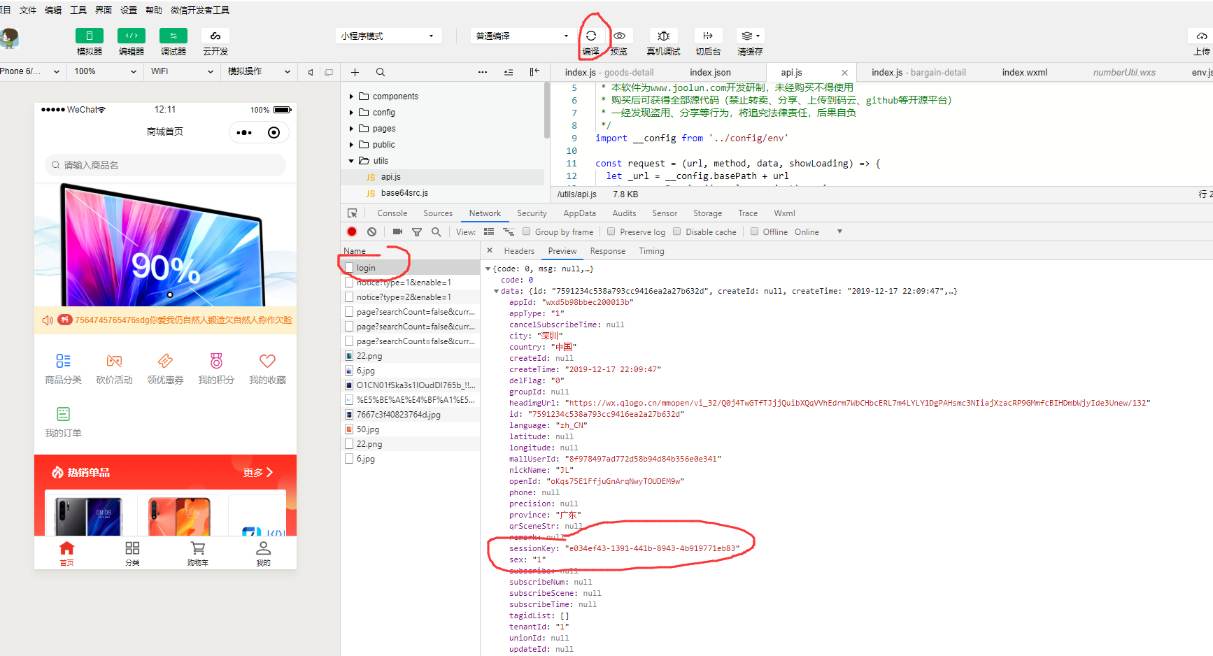
- third_session我们可以通过微信开发者工具获取,编译一下,小程序会调用登录接口,从登录接口我们可以获取到thirdSession;这里注意,要确保当前用户已经手机号登录了商城,如果没有登录商城,是访问不了@ApiLogin注解接口的
- postman调试,在header中带上client-type、third-session、app-id(小程序、公众号需传),各接口地址请查看
joolun-plus-uniapp/utils/api.js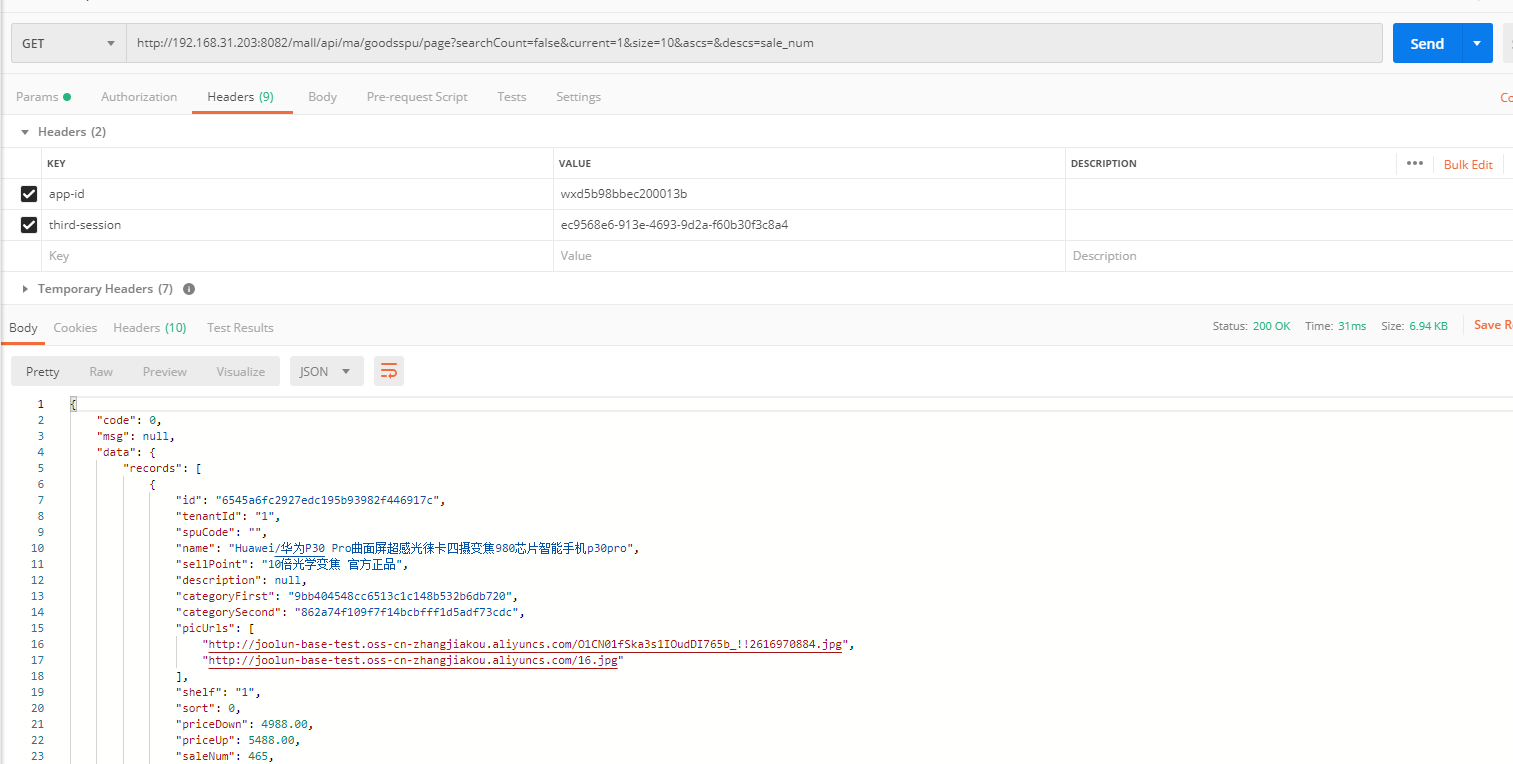
postman调试非@ApiLogin注解的接口
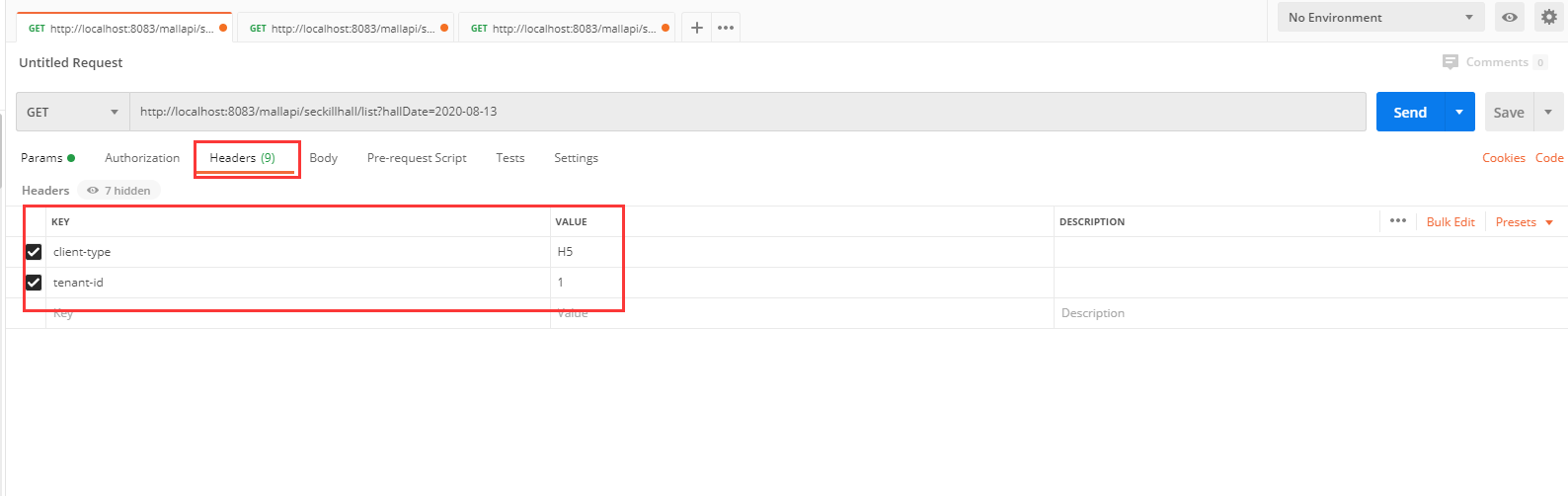
- 在普通h5中没有带@ApiLogin注解的接口是不需要登录的
- 只需在header中带上client-type和tenant-id就能直接访问
拓展
- 假如我要做一个新模块给用户端访问步骤如下
- 新建服务;参考文档【A 如何新建微服务,并用postman接口调试】
- 配置所有接口不走oauth2授权
## spring security 配置 security: oauth2: client: # 无需token访问的url release-urls: - /**- pom.xml引入
joolun-common-portal模块
<dependency>
  	<groupId>com.joolun</groupId>
  	<artifactId>joolun-common-portal</artifactId>
</dependency>