快递100账号准备
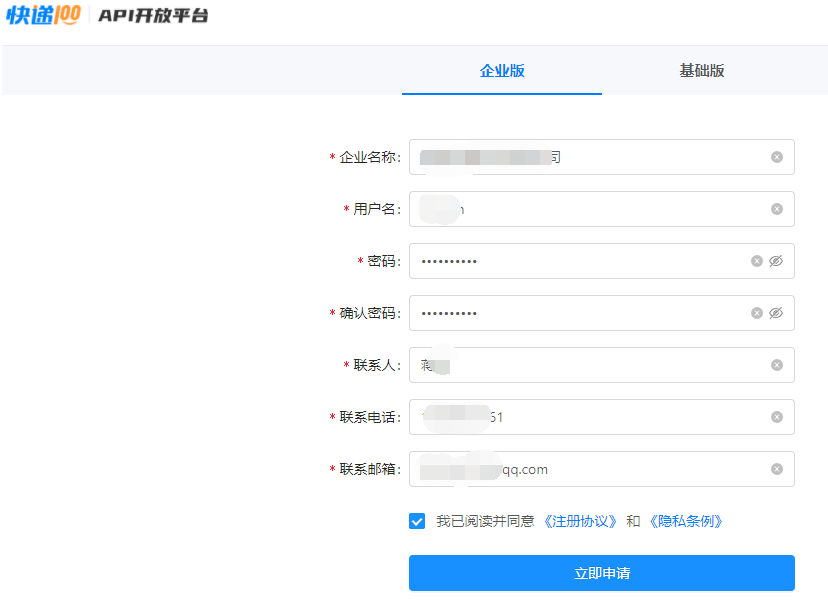
- 申请快递100账号
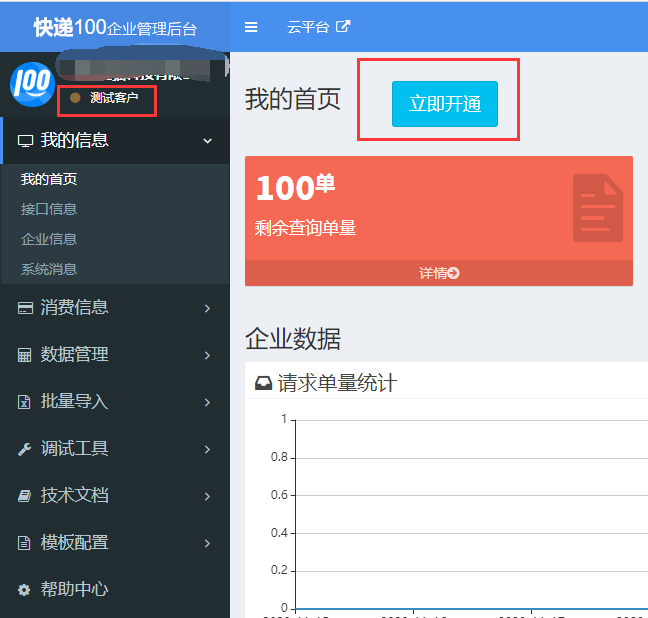
- 登录快递100后台
- 现在账号还只是测试客户,按提示开通成正式客户即可(我们开通的时候是充值了100块钱,以官方实际条件为准)
- 商城配置快递100Key授权码、secret、商城需要用到的快递公司:后台-->【系统管理】-->【快递物流配置】;必配
- 店铺可以配置物流月结账号实现发货时自动获取电子面单:后台-->【商城模块】-->【店铺管理】-->【物流月结账号】;选配
用到的快递100功能
- 信息订阅功能:动态显示物流轨迹信息
- 电子面单功能:自动获取电子面单发货
快递100收费标准
- 请查看官方标准
快递信息订阅功能
使用逻辑
- 后台发货,通过快递100订阅接口对运单进行跟踪,当运单状态发生变化的时候,快递100会将物流轨迹信息推送到我们的回调接口
- 注意:订单发货时只是进行了订阅不会立马有物流信息,要等快递100的推送;如发货后长时间没有物流信息,可登录快递100管理后台查看推送明细
- 配置回调地址,nacos后台application-dev.yml配置文件
base:
  mall:
    # 支付、物流回调地址,即后台外网地址,要保证外网能访问
    notifyHost: http://test.abse.com
核心代码
- 发货时订阅物流:
joolun-mall/joolun-mall-admin/src/main/java/com/joolun/cloud/mall/admin/service/impl/OrderInfoServiceImpl.java中的delivery方法
			//订阅快递100:https://gitee.com/kuaidi100-api/java-demo
			String callbackurl = StrUtil.format("{}{}{}{}{}", mallConfigProperties.getNotifyHost(),
					MallConstants.SERVER_ROUTE_NAME_MALLAPI,
					MallConstants.ORDER_LOGISTICSR_NOTIFY_URL,
					"?tenantId=",
					orderLogistics.getTenantId());//回调地址
			SubscribeParameters subscribeParameters = new SubscribeParameters();
			subscribeParameters.setCallbackurl(callbackurl);
			subscribeParameters.setPhone(orderLogistics.getTelNum());

			SubscribeParam subscribeParam = new SubscribeParam();
			subscribeParam.setParameters(subscribeParameters);
			subscribeParam.setCompany(entity.getLogistics());
			subscribeParam.setNumber(entity.getLogisticsNo());
			subscribeParam.setKey(onfigLogistics.getLogisticsKey());

			SubscribeReq subscribeReq = new SubscribeReq();
			subscribeReq.setSchema(ApiInfoConstant.SUBSCRIBE_SCHEMA);
			subscribeReq.setParam(JSONUtil.toJsonStr(subscribeParam));

			IBaseClient subscribe = new Subscribe();
			subscribe.execute(subscribeReq);
- 物流信息回调,更新物流轨迹信息:
joolun-mall/joolun-mall-api/src/main/java/com/joolun/cloud/mall/api/controller/OrderInfoController.java
    /**
	 * 物流信息回调
	 * @param request
	 * @return
	 */
	@ApiOperation(value = "物流信息回调")
	@PostMapping("/notify-logisticsr")
	public String notifyLogisticsr(HttpServletRequest request, HttpServletResponse response) {
		String param = request.getParameter("param");
		String logisticsId = request.getParameter("logisticsId");
		String tenantId = request.getParameter("tenantId");
		TenantContextHolder.setTenantId(tenantId);
		log.info("物流信息回调:"+param);
		Map<String,Object> map = new HashMap<String,Object>();
		map.put("result",false);
		map.put("returnCode","500");
		map.put("message","保存失败");
		try {
			JSONObject jsonObject = JSONUtil.parseObj(param);
			orderInfoService.notifyLogisticsr(logisticsId, jsonObject);
			map.put("result",true);
			map.put("returnCode","200");
			map.put("message","保存成功");
			//这里必须返回,否则认为失败,过30分钟又会重复推送。
			response.getWriter().print(JSONUtil.parseObj(map));
		} catch (Exception e) {
			map.put("message","保存失败" + e.getMessage());
			//保存失败,服务端等30分钟会重复推送。
			try {
				response.getWriter().print(JSONUtil.parseObj(map));
			} catch (Exception e1) {
				// TODO Auto-generated catch block
				e1.printStackTrace();
			}
		}
		return null;
	}
电子面单
使用逻辑
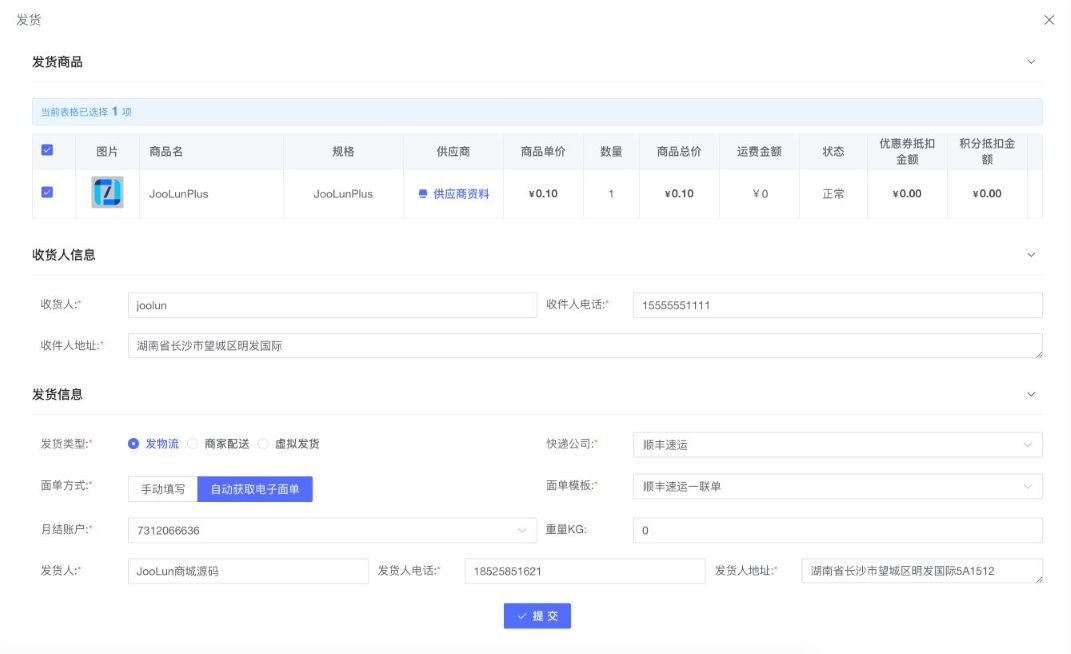
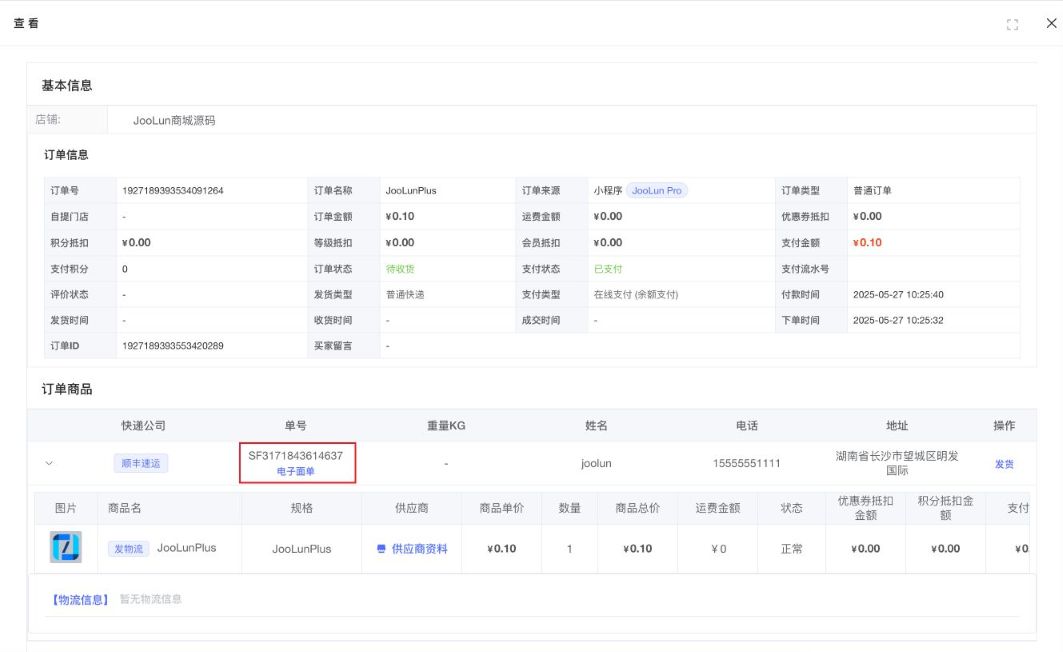
- 当后台发货选择【自动获取电子面单】时,将通过电子面单API自动获取物流单号(快递单号)
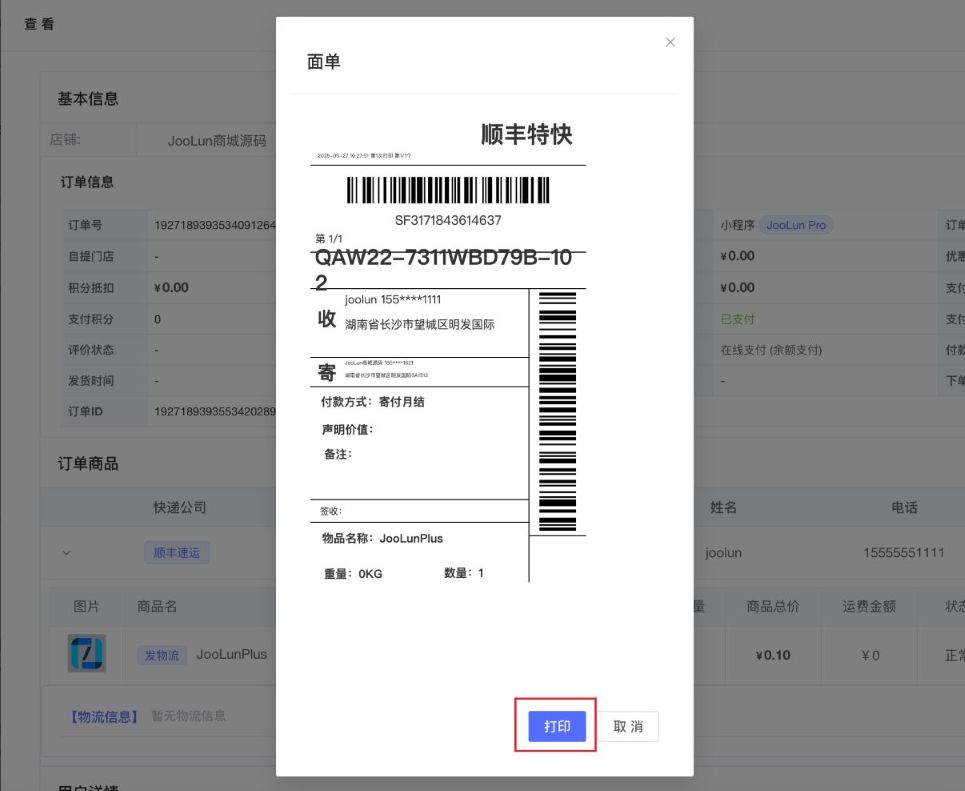
核心代码
- 发货时订阅物流:
joolun-mall/joolun-mall-admin/src/main/java/com/joolun/cloud/mall/admin/service/impl/OrderInfoServiceImpl.java中的delivery方法
	if(MallConstants.DELIVERY_TYPE_1.equals(orderDeliveryDTO.getDeliveryType())){//发物流
			ConfigLogistics configLogistics = configLogisticsService.getOne();
			//调快递100自动获取电子面单
			if(MallConstants.LABEL_WAY_2.equals(orderDeliveryDTO.getLabelWay())){
				//收货人
				ManInfo recManInfo  = new ManInfo();
				recManInfo.setName(orderLogistics.getRecName());
				recManInfo.setMobile(orderLogistics.getRecTel());
				recManInfo.setPrintAddr(orderLogistics.getRecAddress());
				//寄件人,取店铺里的信息
				ManInfo sendManInfo = new ManInfo();
				sendManInfo.setName(orderDeliveryDTO.getSendName());
				sendManInfo.setMobile(orderDeliveryDTO.getSendTel());
				sendManInfo.setPrintAddr(orderDeliveryDTO.getSendAddress());

				OrderReq orderReq = new OrderReq();
				orderReq.setKuaidicom(orderDeliveryDTO.getLogisticsCode());
				orderReq.setCount(1);
				orderReq.setTempId(orderDeliveryDTO.getLabelTemplateId());
				orderReq.setSendMan(sendManInfo);
				orderReq.setRecMan(recManInfo);
				if(orderDeliveryDTO.getWeight() != null){
					orderReq.setWeight(orderDeliveryDTO.getWeight().doubleValue());
				}
				orderReq.setCargo(StrUtil.subWithLength(orderInfo.getName(), 0, 20));
				orderReq.setPrintType(PrintType.HTML);
				//获取物流月结账号
				BaseUser baseUser = SecurityUtils.getUser();
				//供应商账号则查询供应商物流账号
				if(CommonConstants.USER_TYPE_3.equals(baseUser.getType())){
					SupplierLogisticsAccount supplierLogisticsAccount = supplierLogisticsAccountService.getById(orderDeliveryDTO.getShopLogisticsAccountId());
					orderReq.setPartnerId(supplierLogisticsAccount.getAccountId());
					orderReq.setPartnerKey(supplierLogisticsAccount.getAccountKey());
					orderReq.setNet(supplierLogisticsAccount.getNet());
					orderReq.setCode(supplierLogisticsAccount.getCode());
				}else{
					ShopLogisticsAccount shopLogisticsAccount = shopLogisticsAccountService.getById(orderDeliveryDTO.getShopLogisticsAccountId());
					orderReq.setPartnerId(shopLogisticsAccount.getAccountId());
					orderReq.setPartnerKey(shopLogisticsAccount.getAccountKey());
					orderReq.setNet(shopLogisticsAccount.getNet());
					orderReq.setCode(shopLogisticsAccount.getCode());
				}

				String param = JSONUtil.toJsonStr(orderReq);
				String t = System.currentTimeMillis() + "";

				PrintReq printReq = new PrintReq();
				printReq.setT(t);
				printReq.setKey(configLogistics.getLogisticsKey());
				printReq.setSign(SignUtils.printSign(param,t,configLogistics.getLogisticsKey(),configLogistics.getLogisticsSecret()));
				printReq.setMethod(ApiInfoConstant.ORDER);
				printReq.setParam(param);

				IBaseClient baseClient = new LabelV2();
				HttpResult httpResult = baseClient.execute(printReq);
				if(httpResult.getStatus() == 200){
					JSONObject jSONObject = JSONUtil.parseObj(httpResult.getBody());
					if(jSONObject.getInt("code") == 200 && jSONObject.getBool("success")){
						JSONObject data = jSONObject.getJSONObject("data");
						//获取快递单号
						orderDeliveryDTO.setLogisticsNo(data.getStr("kuaidinum"));
						orderLogistics.setLabelUrl(data.getStr("label"));
					}else{
						throw new RuntimeException(jSONObject.getStr("message"));
					}
				}else{
					throw new RuntimeException(httpResult.getError());
				}
			}
			orderLogistics.setLabelWay(orderDeliveryDTO.getLabelWay());
			orderLogistics.setLogisticsCode(orderDeliveryDTO.getLogisticsCode());
			orderLogistics.setLogisticsNo(orderDeliveryDTO.getLogisticsNo());
			orderLogistics.setStatus(OrderLogisticsEnum.STATUS_1.getValue());
			configLogistics.getLogisticsCompany().forEach(logistics -> {
				JSONObject jsLogistics = JSONUtil.parseObj(logistics);
				if(StrUtil.equals(jsLogistics.get("code").toString(), orderDeliveryDTO.getLogisticsCode())){
					orderLogistics.setLogisticsName(jsLogistics.get("name").toString());
				}
			});
			orderLogisticsService.saveOrUpdate(orderLogistics);
			orderLogisticsDetailService.remove(Wrappers.<OrderLogisticsDetail>lambdaQuery()
					.eq(OrderLogisticsDetail::getLogisticsId,orderLogistics.getId()));//删除旧的物流路由
			//订单详情更新订单物流ID
			orderItem.setLogisticsId(orderLogistics.getId());

			//订阅快递100:https://gitee.com/kuaidi100-api/java-demo
			String callbackurl = StrUtil.format("{}{}{}{}{}", mallConfigProperties.getNotifyHost(),
					MallConstants.SERVER_ROUTE_NAME_MALLAPI,
					MallConstants.ORDER_LOGISTICSR_NOTIFY_URL,
					"?tenantId=",
					orderInfo.getTenantId());//回调地址
			SubscribeParameters subscribeParameters = new SubscribeParameters();
			subscribeParameters.setCallbackurl(callbackurl);
			subscribeParameters.setPhone(orderLogistics.getRecTel());

			SubscribeParam subscribeParam = new SubscribeParam();
			subscribeParam.setParameters(subscribeParameters);
			subscribeParam.setCompany(orderDeliveryDTO.getLogisticsCode());
			subscribeParam.setNumber(orderDeliveryDTO.getLogisticsNo());
			subscribeParam.setKey(configLogistics.getLogisticsKey());

			SubscribeReq subscribeReq = new SubscribeReq();
			subscribeReq.setSchema(ApiInfoConstant.SUBSCRIBE_SCHEMA);
			subscribeReq.setParam(JSONUtil.toJsonStr(subscribeParam));

			IBaseClient subscribe = new Subscribe();
			HttpResult httpResult = subscribe.execute(subscribeReq);
			if(httpResult.getStatus() == 200){
				JSONObject jSONObject = JSONUtil.parseObj(httpResult.getBody());
				if(!"200".equals(jSONObject.get("returnCode"))){
					throw new RuntimeException(jSONObject.getStr("message"));
				}
			}else{
				throw new RuntimeException(httpResult.getError());
			}
		}